Tech gifts work best when they fit naturally into someone’s routines, whether that means a better home workspace, easier entertainment, or a new creative hobby. This guide brings together 19 ideas across those interests.
Consider what devices the recipient already uses and where they’ll use the gift most. Compatibility and available space can matter as much as features.
Tech Christmas Gifts to Explore
1. Smart 4K Streaming Projector
A Big-Screen Night In

- Built-in VIDAA platform offers apps and live TV channels.
- Auto focus and keystone correction help adjust the picture when moving rooms.
- AirPlay support and Dolby Audio suit shared movie nights.
Best For: Movie fans or gamers with a space for large-screen viewing.
2. XPPen Artist 16 3rd Drawing Display
A Canvas for Digital Artists
XPPen Artist 16 3rd Drawing Display
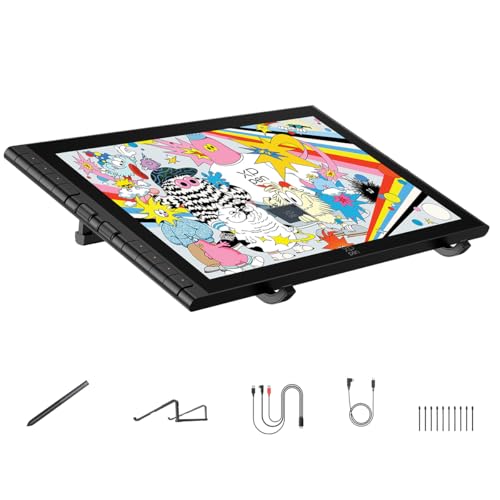
- The 15.4-inch display lets artists draw directly on screen.
- Includes a stylus, foldable stand, and drawing glove.
- Compatible with Mac, Windows, Android, ChromeOS, and Linux.
Best For: Illustrators and design hobbyists who want a screen-based drawing setup.
3. NETGEAR Orbi 370 WiFi 7 Mesh System
Stronger Coverage Around the Home
NETGEAR Orbi 370 WiFi 7 Mesh System

- The three-piece system is listed for coverage up to 6,000 square feet.
- WiFi 7 supports compatible devices alongside WiFi 6 and WiFi 5 devices.
- Guided setup and network management use the Orbi app.
Best For: Households looking to address WiFi dead zones across a larger home.
4. Jeazans Android Tablet Bundle with Keyboard
5. DJI Osmo Action 4 Essential Combo
For Adventures Worth Recording
DJI Osmo Action 4 Essential Combo
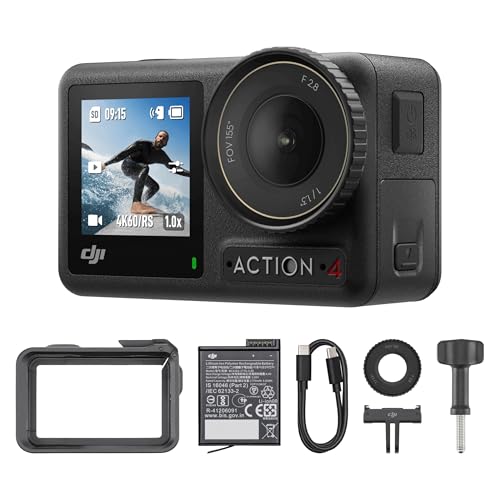
- Captures video in 4K at up to 120 frames per second.
- Waterproofing is listed to 18 meters, and the camera has dual touchscreens.
- Three stabilization modes and magnetic quick release support action filming.
Best For: Cyclists, hikers, and creators recording outdoor activities.
6. Anker Prime 14-in-1 Docking Station
A More Capable Desk Setup
Anker Prime 14-in-1 Docking Station

- Provides dual HDMI connections and a total of 14 ports.
- Offers up to 160W total output for charging connected devices.
- Supports USB-C, USB4, and Thunderbolt laptops; check display needs and OS compatibility.
Best For: Laptop users building a home desk with multiple peripherals or displays.
7. EnginStar Portable Power Station
Power for Campsites and Road Trips
EnginStar Portable Power Station

- Offers 296Wh capacity and 300W AC output in a portable unit.
- Has two AC outlets, USB-C, USB-A, and regulated DC outputs.
- Can charge from a wall outlet, car socket, or compatible solar panel sold separately.
Best For: Campers or travelers powering small devices away from an outlet.
8. XTEINK X4 Pro Pocket E-Reader
A Small Library for the Commute

- The 4.3-inch E-Ink screen has adjustable warm and cool front lighting.
- Supports EPUB, TXT, PDF, and MOBI files, with microSD expansion up to 256GB.
- Combines touchscreen gestures with physical page-turn buttons.
Best For: Readers who want a compact device for travel or bedtime reading.
9. JADENS Bluetooth Thermal Label Printer
A Handy Shipping-Desk Upgrade
JADENS Bluetooth Thermal Label Printer

- Prints monochrome labels up to 4 inches wide using thermal printing.
- Connects by Bluetooth or USB, with device support varying by operating system.
- Works with various shipping platforms and supports fanfold or roll labels.
Best For: Small-business owners or frequent package shippers.
10. EPOMAKER x Aula F75 Mechanical Keyboard
A Tidy, Customizable Keyboard
EPOMAKER x Aula F75 Mechanical Keyboard

- The 75% layout keeps a smaller footprint while retaining essential keys.
- Connects by Bluetooth, 2.4GHz wireless, or USB-C.
- Hot-swappable sockets and a media knob offer customization and quick control.
Best For: PC gamers, typists, or desk workers who enjoy a compact keyboard.
11. Frameo 10.1-Inch WiFi Photo Frame
Family Photos, Shared From Afar
Frameo 10.1-Inch WiFi Photo Frame

- A 10.1-inch touchscreen displays photos at 1280 by 800 resolution.
- The Frameo app can send photos and videos over 2.4GHz WiFi.
- Stores photos locally in 32GB memory and can display them offline.
Best For: Families who want to share photos across households.
12. 3-in-1 Magnetic Wireless Charging Stand
A Neater Nightstand
3-in-1 Magnetic Wireless Charging Stand

- Designed to charge a compatible iPhone, Apple Watch, and AirPods together.
- The stand supports portrait and landscape phone viewing.
- A blue ambient light has touch controls for switching it off or adjusting brightness.
Best For: Apple device users who want a shared bedside charging spot.
13. Weilisi 10-Inch Ring Light with Phone Holder
A Flexible Setup for Video Calls
Weilisi 10-Inch Ring Light with Phone Holder

- Includes a stand, phone holder, and wireless smartphone remote.
- Offers adjustable brightness and multiple color modes.
- USB-powered and compatible with iOS and Android smartphones.
Best For: Video-call users, makeup hobbyists, and phone content creators.
14. DWARFLAB Dwarf 3 Smart Telescope
A Guided Look at the Night Sky
DWARFLAB Dwarf 3 Smart Telescope

- App-controlled imaging supports astronomy, wildlife, and landscape subjects.
- Automatic tracking and image processing are designed to simplify capture.
- The set includes a carrying bag, magnetic filters, and a USB-C cable.
Best For: Astronomy fans and curious beginners who enjoy guided sky viewing.
15. SanDisk Extreme Portable 2TB SSD
Room to Carry Large Projects
SanDisk Extreme Portable 2TB SSD

- Provides 2TB of portable storage with USB-C connectivity.
- The listing gives read speeds up to 1050MB/s and write speeds up to 1000MB/s.
- IP65 water and dust resistance and password protection are listed.
Best For: Photographers, students, and professionals moving large files.
16. Philips Hue Smart Lighting Starter Kit
Color and Control for a Room
Philips Hue Smart Lighting Starter Kit

- Includes three color-capable A19 E26 bulbs, a Bridge Pro, and a tap dial switch.
- Bulbs offer tunable warm-to-cool white light and color options.
- The Bridge supports app features, automations, and additional Hue devices.
Best For: People who enjoy customizable room lighting and convenient controls.
17. Sennheiser Profile USB Microphone Bundle
A Clearer Voice for Recordings
Sennheiser Profile USB Microphone Bundle

- The bundle includes a USB condenser microphone, boom arm, and pop filter.
- Onboard controls include mute, gain, mix, and headphone level.
- Connects by USB-C and has a cardioid pickup pattern.
Best For: Podcasters, streamers, and remote workers recording voice.
18. xTool M2 10W Enclosed Laser Engraver
A Tool for Personalized Projects
xTool M2 10W Enclosed Laser Engraver

- Built-in cameras provide a preview of the work area for placement.
- The 10W laser is described for engraving and cutting compatible materials such as wood, leather, felt, and paper.
- The xTool Studio software includes templates; optional modules are sold separately.
Best For: Makers who want to personalize projects with compatible materials.
19. Bose QuietComfort Wireless Headphones
A Quieter Listening Routine
Bose QuietComfort Wireless Headphones

- Over-ear headphones offer active noise cancellation and Quiet and Aware modes.
- Bluetooth multipoint lets users switch between connected devices.
- Battery life is listed as up to 24 hours, with a wired listening option.
Best For: Commuters, travelers, or listeners who value focused audio.
Choosing a Tech Gift for This Recipient
Start with how the person spends their time. A creator may get more use from a drawing display, microphone, action camera, or portable SSD than from another general-purpose gadget. Someone who likes hosting could enjoy the projector or shared photo frame, while a reader may appreciate a pocket-sized e-reader. For a home setup, think about the everyday friction they mention: weak WiFi in a room, a desk crowded with cables, or charging several devices overnight.
Look at the space and routine around the gift, too. A large display or ring light needs room to set up and store. A laser engraver is a substantial tool for a committed maker, while a keyboard, headphones, or external drive can fit more easily into an existing workspace. A portable power station may be useful for camping, but it still needs to match the devices and power needs the recipient plans to bring.
Set a Budget Around the Use
Tech gifts vary widely in scale. Small accessories and desk upgrades can be thoughtful without requiring the recipient to reorganize a room. Larger equipment, such as a projector, telescope, drawing display, mesh system, or laser engraver, makes sense when you know the person has a clear interest and a place to use it.
Consider the ongoing setup as part of the cost. The power station’s solar panel is not included. The engraver’s optional modules are sold separately. The Anker dock’s display behavior and OS support vary, and it does not support Linux. The label printer’s phone printing requires its app, while computer support depends on the operating system and connection. These details help keep the gift useful after it is opened.
Check Compatibility and Personalization
Before choosing a device, check what the recipient already owns. The magnetic charging stand requires compatible Apple devices and a magnetic case or compatible iPhone. The dock needs a laptop with the appropriate USB-C, USB4, or Thunderbolt capabilities; macOS mirrors the image across the two external displays according to the listing. The mesh router is stated for use in the US and connects to existing modem equipment, so geography and current internet setup matter.
For creative gifts, compatibility includes software and materials. The drawing display lists support for several operating systems, but the recipient should confirm their preferred apps and computer connections. The engraver is described for compatible material types, with color printing and certain fine engraving functions requiring add-on modules. If you can personalize the gift, do it through a useful setup: load a few family photos on the digital frame, pair a charging stand with the recipient’s devices, or include a small project idea for a camera or telescope.
Plan Timing and Last-Minute Choices
For a Christmas gift, allow time to confirm fit before buying. Ask a discreet question about device models, operating systems, room layout, or hobbies when compatibility is uncertain. For a larger tool, consider whether the person has the time and interest to learn it. A simple accessory may be the better fit when you are choosing for someone whose exact setup is unknown.
When time is short, choose a gift whose usefulness is easy to understand and whose requirements are clear. Headphones, an e-reader, a photo frame, or a portable SSD can serve familiar routines, provided the recipient’s devices support them. For gifts that need accounts, apps, a network, or installation, include a brief note explaining what they will need to get started. That small bit of context can make a tech Christmas gift feel considered and ready to use.