If you’re shopping for a large button remote for seniors, the biggest priorities are usually simple controls, readable buttons, and quick setup. The right remote can make everyday TV use far less frustrating.
In this roundup, we focus on models designed for straightforward viewing, with clear layouts, familiar buttons, and compatibility that fits common home TV setups.
Best 10 Large Button Remote for Seniors Picks for 2026
Classic Universal Pick
GE Big Button Universal Remote Control

- Large buttons are easy to read and press
- Supports up to two devices
- Simple setup with auto code search and direct entry
Best For: basic home, nursing home, or assisted living TV setups
Backlit Multi-Device Choice
Philips BigEZ OneTouch Big Button Remote

- Fully backlit keypad for better visibility
- Large color-coded volume and channel buttons
- Controls up to 2 devices with OneTouch setup
Best For: Users who want a senior-friendly remote with backlit buttons and some multi-device control
Most Vision-Friendly
GE BigEZ Backlit Big Button TV Remote
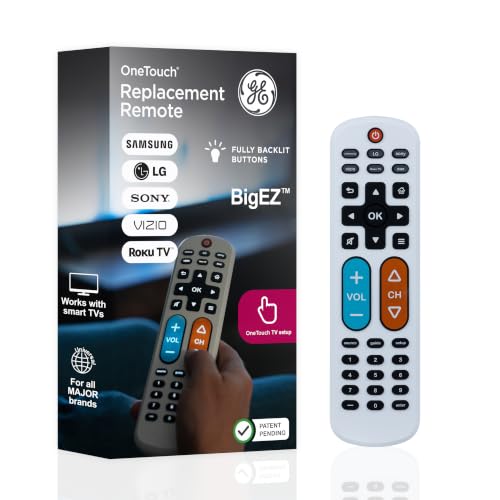
- Fully backlit buttons for better visibility
- Preset support for major TV brands
- Controls TV plus one extra device
Best For: Seniors and visually impaired users who want an easy-to-see universal remote
Best TV-Only Simple Remote
Big Button Universal Remote for TVs

- Extra-large enter button with tactile feedback
- TV-only design for major brands
- Compact and lightweight to handle
Best For: Seniors or caregivers who want a simple TV-only remote with large buttons
Senior-Friendly Simplicity – Flipper Big Button TV Remote for Seniors
If you want a large button remote for seniors that strips TV control down to the essentials, Flipper is built around that exact use case. Its 4-button layout keeps power, volume, channel, and mute easy to find, while the hidden slide-out keys let caregivers preprogram favorites without cluttering the main face.
Best For: Seniors, dementia care, and traditional TV setups where simplicity matters most.
Pros:
- Oversized, color-coded buttons are easy to see and feel
- Controls TV and cable/satellite basics from one remote
- Can store up to 25 favorite channels for quick access
- Designed for low vision, arthritic hands, and dementia support
Cons:
- Does not work with streaming apps or app menus
- Requires two AA batteries, which are not included
Flipper is a strong pick if the goal is reducing confusion, not adding features. It works best in homes where TV watching is still centered on broadcast, cable, or satellite channels.
Classic Universal Pick – GE Big Button Universal Remote Control
This large button remote for seniors focuses on straightforward everyday control without extra complexity. The GE remote uses a large, simplified keyboard, supports up to two devices, and is designed for basic entertainment setups where ease of use matters more than advanced features.
Best For: Basic TV-and-sound setup users who want a simple universal remote with broad compatibility.
Pros:
- Big, easy-to-read buttons and an ergonomic shape
- Controls up to two devices such as TV, soundbar, or cable box
- Simple setup with auto code search and direct code entry
- Preprogrammed for Samsung TVs and includes U.S.-based support
Cons:
- Only supports two devices
- Requires two AA batteries, which are not included
GE’s remote is a practical middle ground if you want a familiar universal layout and broad TV-brand compatibility. It’s especially appealing for homes, nursing facilities, and assisted living environments that value reliability over extras.
Ultra-Simple TV Remote – EZclicker Big Button Remote for Seniors
If you need a large button remote for seniors that keeps things as simple as possible, EZclicker is aimed squarely at TVs only. It uses big, tactile controls and a very basic programming method, making it a straightforward choice for users who don’t need cable-box or streaming support.
Best For: Seniors who only want to control a television and prefer an extra-simple orange remote.
Pros:
- Large buttons and tactile feedback help with low vision and limited dexterity
- Very simple setup using mute and volume buttons
- Lightweight and compact to hold and store
- Works with major TV brands
Cons:
- Does not work with cable boxes or streaming devices
- Requires two AAA batteries, which are not included
EZclicker is best viewed as a TV-only solution for users who want the smallest learning curve possible. If the household setup is just television, its simplicity may be exactly what makes it useful.
No-Setup TV Control – Gvirtue Big Button Universal Remote
This large button remote for seniors is designed for quick use right out of the box. With no programming needed and an extra-large enter button, it keeps the focus on basic TV control for users who want a simple, tactile remote without setup hassles.
Best For: Seniors who want a no-programming TV remote for major television brands.
Pros:
- No setup or pairing required before use
- Extra-large enter button and tactile controls improve usability
- Compatible with many major TV brands
- Lightweight and ergonomic design
Cons:
- Not compatible with streaming devices or cable boxes
- Includes a 3-day warranty description in the supplied details
Gvirtue’s remote is the easiest option here if you want to avoid programming entirely. It’s a practical match for users who only need basic television functions and value instant, uncomplicated operation.
Classic TV Control – Large Button TV Remote for Seniors
If you want a large button remote for seniors that keeps TV control simple, this model focuses on the basics: big, clearly marked buttons, a clean layout, and straightforward infrared operation. It’s designed as a traditional TV remote replacement for everyday use, especially when you want fewer misclicks and less confusion.
Best For: Seniors, low-vision users, and families who need a simple replacement remote for a standard TV.
Pros:
- Extra-large buttons with a clear layout make key controls easier to see and press.
- Compatible with most major TV brands for broad replacement use.
- Lightweight, ergonomic design aims for a comfortable grip.
- Simple TV-only control keeps operation focused and easy to learn.
Cons:
- Not compatible with DVD players, cable boxes, or niche TV brands.
- No voice control or advanced smart-TV features.
- Limited to one supported device.
This is a practical pick if you need a no-frills remote that emphasizes visibility and ease of use over extra functions. It’s best suited to standard television setups where simplicity matters most.
Orange Easy-Press Pick – EZclicker Big Button Universal TV Remote
This large button remote for seniors is built around easy handling, with an extra-large enter button, tactile feedback, and a compact shape that’s meant to feel comfortable in the hand. It’s a simple TV remote option if you want an easy setup and a bright, easy-to-find design.
Best For: Seniors, grandparents, and users with limited dexterity or vision who want a straightforward TV-only remote.
Pros:
- Extra-large buttons and tactile feedback support easier pressing and navigation.
- Simple programming process can be done by holding Mute and Volume+ together.
- Compact, lightweight design is easy to hold and store.
- Works with major TV brands for broad TV-only use.
Cons:
- Not for cable boxes, Fire TV sticks, or Roku sticks.
- Requires 2 AAA batteries, which are not included.
- Compatibility depends on supported TV models.
Overall, this is a good fit when you want a simple remote that reduces setup complexity and keeps the controls easy to feel and press. It focuses on TV use only, which helps keep things uncomplicated.
Backlit Multi-Device Choice – Philips BigEZ OneTouch Big Button Remote
For shoppers comparing a large button remote for seniors, this Philips option stands out for its backlit keypad and oversized color-coded controls. It’s made for easier navigation in low light and can handle more than just the TV, which makes it a more flexible pick than basic replacement remotes.
Best For: Seniors and visually impaired users who want a backlit, easy-to-use remote with some multi-device flexibility.
Pros:
- Fully backlit keypad improves visibility in dim rooms.
- Large blue volume button and large orange channel button help with quick navigation.
- Supports up to 2 devices, including some TVs plus a set-top box, streaming player, or soundbar.
- OneTouch setup is designed to be simple, with one-button programming for supported TVs.
Cons:
- Only preprogrammed for Samsung, LG, Sony, Vizio, and Roku TVs.
- Uses 2 AA batteries, which are required but not included in the notes.
- May still need support or setup help for some device pairings.
This is a strong choice if you want easier-to-see buttons plus a bit more flexibility than a basic TV-only remote. The backlighting and color-coded layout are the biggest reasons to consider it.
Simple Everyday Pick – Big Button TV Remote for Easy Daily Use
If you want a large button remote for seniors that keeps TV control straightforward, this model focuses on the basics: oversized buttons, a clear layout, and easy setup. It is a practical replacement for a lost or worn-out TV remote, especially if you want something lightweight and simple to use every day.
Best For: Seniors or low-vision users who mainly need a simple universal TV remote with large, easy-to-press buttons.
Pros:
- Oversized buttons with clear markings make pressing commands easier and more accurate.
- Universal infrared design works with most IR-controlled televisions and similar devices.
- Auto code search setup keeps installation simple and quick.
- Lightweight, ergonomic shape helps reduce hand fatigue during longer use.
Cons:
- Supports only 1 device, so it is not meant for multi-device control.
- Batteries are not included.
- It is limited to infrared-compatible equipment.
Overall, this is a no-frills option for anyone who values large buttons and uncomplicated TV control over advanced features. It is best suited to straightforward daily use in a single-TV setup.
Most Vision-Friendly – GE BigEZ Backlit Big Button TV Remote
This large button remote for seniors is built for visibility and convenience, with an extra-large white body, fully backlit buttons, and color-coded volume and channel keys. It is a strong choice if you want a simple universal remote that is easy to see in dim rooms and easy to set up for common TV brands.
Best For: Seniors and visually impaired users who want a backlit, easy-to-see remote for major TV brands and one extra device.
Pros:
- Fully backlit buttons improve visibility in low light.
- Preset buttons for Samsung, LG, Vizio, Sony, and Roku TVs simplify setup.
- Controls up to 2 devices, including a TV plus one extra device.
- Color-coded volume and channel buttons add extra clarity for quick navigation.
Cons:
- Requires 2 AA batteries, which are not included.
- Only supports 2 devices total.
- It is not intended for users who want deeper universal control across many devices.
For shoppers who prioritize visibility, this remote stands out because the backlit layout and simple brand presets reduce confusion. It is a polished everyday option for seniors who want easy TV control without a complicated learning curve.
Best TV-Only Simple Remote – Big Button Universal Remote for TVs
If you need a large button remote for seniors that stays focused on TV control only, this model keeps the layout simple and the setup process short. It is designed for major TV brands, with an extra-large enter button, tactile feedback, and a compact shape that is easy to handle and store.
Best For: Seniors, dementia care, or low-vision users who want a TV-only remote with big buttons and simple programming.
Pros:
- Extra-large enter button and tactile feedback support easier operation.
- Simple programming method uses the Mute button and on-screen volume response.
- Works with top TV brands and is limited to TVs for a focused control experience.
- Compact and lightweight design makes it easy to hold and store.
Cons:
- Not compatible with cable boxes, Fire TV sticks, or Roku sticks.
- Batteries are not included.
- Supports only 1 device.
This is a good pick if you want to avoid extra buttons and keep the remote strictly for television use. Its simplified design makes it especially practical for users who need a clear, low-stress control option.
How We Picked the Best Large Button Remote for Seniors
We looked for remotes that keep the learning curve low: large, high-contrast buttons; a sensible button layout; and broad compatibility with popular TV brands and, where noted, cable boxes. We also favored models that are easy to program or even simpler to use out of the box.
For a Large Button Remote for Seniors, the goal is less about extra features and more about reliable basics that reduce confusion.
Quick Comparison
Some options are best for traditional TV viewing only, while others work as universal replacements across brands like Samsung, LG, Sony, Vizio, Roku TV, and more. If the user mainly watches live TV, a basic model with only the essential buttons may be the best fit. If they switch between devices, a universal remote with a broader code library is more practical.
Key Buying Factors for Large Button Remote for Seniors
Button Size and Contrast
Look for oversized buttons with clear labeling and strong color contrast. This helps reduce mispresses and makes navigation easier in low light.
Layout Simplicity
The best remotes keep only the functions that matter most: power, volume, channel, mute, and maybe a few menu or input buttons. Too many extras can create confusion.
Compatibility
Check whether the remote supports your TV brand and whether it works with a cable box, streaming device, or both. Some large-button remotes are intentionally limited to basic TV control and do not support streaming devices.
Setup and Power
Easy programming matters. A remote that pairs quickly can save time and frustration, especially for households helping an older adult set it up. Also confirm battery type and how long the remote is likely to stay powered with regular use.
Who Should Buy Which Large Button Remote for Seniors?
If the user wants the simplest possible experience, choose a basic senior-friendly remote with a minimal button set. If they use multiple TV brands or need a replacement in a mixed-device household, a universal model is the safer choice. If they rely mostly on cable TV, prioritize compatibility with the cable box first.
For most buyers, the best Large Button Remote for Seniors is the one that balances simplicity, compatibility, and a layout the user can recognize immediately.